We have all experienced the late-night social media scroll. You are swiping through your feed when you spot a photo of a stunning living room setup. The coffee table is perfect. You check the caption, hoping for a link. Nothing. You check the comments, and the brand has replied with “Link in bio!” You click the bio, navigate to a messy homepage, search for “wood coffee table,” and either spend five frustrating minutes looking or simply give up.
That brand just lost a sale because they made buying too difficult.
A shoppable feed solves this exact problem. It bridges the gap between product discovery and checkout, allowing you to turn passive scrollers into active buyers by eliminating the steps between inspiration and purchase. This guide covers everything you need to know, from how shoppable content works to real examples, tools, and a step-by-step setup for your Shopify store.
What Is a Shoppable Feed?
A shoppable feed is a form of interactive shopping content that allows users to click on products directly within images, videos, or social media posts and purchase them without leaving the content they are viewing. Think of it as a digital storefront where every item has a clickable tag. Instead of navigating away from the content to find a product, users can explore and buy within the same experience.
This type of shoppable content is widely used in ecommerce to reduce friction in the buying journey and increase the percentage of engaged visitors who convert to customers.
How Does a Shoppable Feed Work?
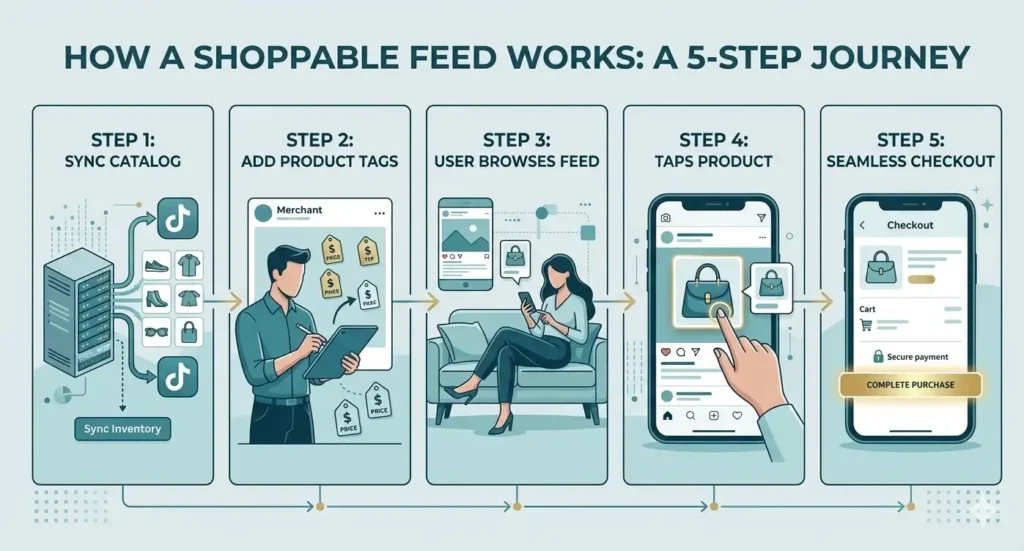
At its core, a shoppable feed connects your product catalog with your visual content. Here is how the full process works.
First, your ecommerce store is connected to a platform. For Shopify merchants, this means linking your product catalog to a tool that can pull your inventory and make it available for tagging. Second, you upload images or videos and use ecommerce product tagging to link specific products to specific moments within that content. Third, when a visitor views your content, they see clickable prompts or hotspots over the tagged products. Tapping a tag reveals the product name, price, and a purchase option. Fourth, the visitor completes checkout without navigating through multiple pages or leaving the experience they were already in.
This process transforms static content into interactive shopping experiences that shorten the buyer journey and remove the friction that causes most ecommerce drop-off.
Benefits of Using a Shoppable Feed
The performance impact of shoppable feeds is backed by how ecommerce customers actually behave. Here is what each benefit means in practice.
Increased conversions by removing friction at the critical moment. Every extra step in the path to purchase creates an opportunity for the customer to change their mind. Research from Baymard Institute shows that the average documented cart abandonment rate is nearly 70 percent, with too many steps being one of the most cited reasons. A shoppable feed removes the search, the navigation, and the waiting. The product is available to buy at the exact moment the customer wants it.
Better user experience that matches modern expectations. Customers in 2026 expect convenience. They have grown up with one-tap purchases, same-day delivery, and instant everything. A shoppable feed meets them where they already are, inside the content they are already consuming, rather than asking them to go somewhere else. Brands that remove friction from the buying experience build stronger customer relationships and see higher repeat purchase rates because the experience itself becomes part of what customers enjoy about the brand.
Faster purchase journey that captures impulse buying. What used to require a sequence of steps now happens in under a minute. A visitor watches a video, sees a product they want, taps the tag, and completes checkout. The entire journey from discovery to purchase happens while the impulse is still fresh. This is particularly valuable for fashion, beauty, home decor, and lifestyle categories where purchase decisions are heavily driven by visual appeal and emotional response rather than research.
Higher average order value through multi-product discovery. When a visitor can browse a feed of tagged content rather than searching for individual products, they are exposed to a wider range of your catalog in a visually compelling format. Lifestyle shots that tag multiple products in a single image or video allow customers to buy a complete look or setup rather than a single item, which directly increases average order value.
Examples of Shoppable Feeds in Practice
Instagram: Instagram is one of the most established platforms for shoppable content. Brands can tag products in feed posts, Stories, and Reels. Fashion and beauty brands in particular have built significant revenue channels through Instagram Shopping, with some reporting that tagged content drives a higher conversion rate than traditional product page traffic because the purchase intent has been primed by the content itself.
On-site shoppable feeds: Many brands now embed a “Shop our Instagram” or “Shop the look” section directly on their website homepage. This brings the social browsing experience into a context where the visitor is already in a buying mindset. On-site shoppable feeds, when built correctly, consistently outperform social platform feeds in conversion because the visitor has already demonstrated intent by navigating to the store. Nike and Zara both use on-site shoppable content to showcase products in lifestyle settings directly on their ecommerce pages, reducing the gap between inspiration and checkout for their core audiences.
Video-based shoppable feeds on TikTok and YouTube: Both platforms now support shoppable video formats where product tags sit directly over items in the content. TikTok Shop has been particularly impactful for brands targeting younger audiences, creating a discovery-to-purchase loop that happens entirely within the app without redirecting to an external store.
When Should You Use a Shoppable Feed?
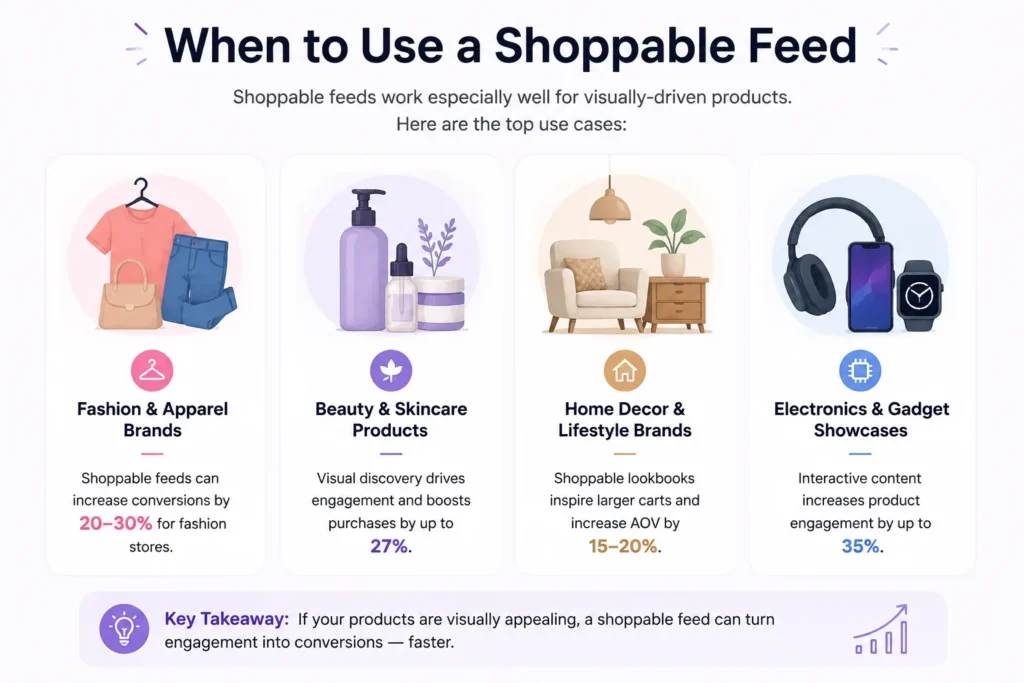
A shoppable feed works best when your products have strong visual appeal and your customers make decisions based on seeing the product in a real context rather than reading a specification sheet. Fashion and apparel brands see the highest impact because the buying decision is almost entirely based on how the product looks when worn. Beauty and skincare benefit from demonstration content where seeing the product applied increases purchase confidence. Home decor and lifestyle brands benefit because customers want to see how pieces look in a real living space before buying. Electronics and gadget brands can use shoppable video to demonstrate functionality in a way that a static product page cannot replicate.
The question to ask is simply: does seeing my product used, worn, or placed in a real environment increase the likelihood that someone will buy it? If yes, a shoppable feed belongs in your ecommerce strategy.
How to Create a Shoppable Feed for Your Shopify Store
Setting up a shoppable feed is no longer a complex technical project. Here is the process from start to finish.
Step 1: Audit and optimize your product catalog. Before syncing your inventory, make sure your product data is clean. High-resolution images and accurate metadata matter because both Google’s algorithms and social platform discovery systems prioritize feeds with strong product data. Incomplete or inaccurate catalog data creates friction further down the funnel when a customer clicks a tag and finds information that does not match what they saw in the content.
Step 2: Choose your platform. Decide where your shoppable feed will have the most impact. Instagram and TikTok are strong for discovery among new audiences. On-site shoppable feeds embedded directly on your Shopify store typically see higher conversion rates because the visitor is already in a buying mindset. A combined approach, using social platforms to drive discovery and your on-site feed to convert, is the most effective strategy for most brands.
Step 3: Connect your catalog. For Shopify merchants, manual coding is no longer necessary. A dedicated app connects your Shopify store and your social media accounts in minutes. Once connected, you can pull in your latest videos and images from Instagram, TikTok, YouTube, and Facebook automatically. New content syncs without manual uploads, meaning your on-site feed stays current without ongoing maintenance.
Step 4: Tag your products. You tag specific products in your videos or photos by placing hotspots directly over the items. Place tags where they are clearly visible but not covering important visual elements. On mobile, ensure the hotspot is large enough to tap comfortably with a thumb. For lifestyle shots featuring multiple products, use multi-tagging to link each item individually. A single video featuring a hoodie, joggers, and sneakers with three separate tags increases your average order value significantly compared to tagging just one item.
Step 5: Monitor performance. Track clicks, conversions, and engagement to understand which content formats, which products, and which placement types generate the best results. This data shapes your future content decisions and helps you allocate production resources toward what actually drives revenue.
Best Tools to Create Shoppable Feeds
Pixlee is strong for user-generated content and social proof, making it useful for brands that want to curate and display customer content alongside their own.
Sauce is built primarily for video commerce and interactive shopping experiences, with a focus on shoppable video rather than static image feeds.
DataFeedWatch and Channable are best suited for managing product feeds across multiple advertising and shopping platforms rather than creating on-site shoppable experiences.
Check out Reevli’s Roadmap for integrating all platforms for shoppable videos.
Common Mistakes to Avoid
Overloading with tags. Too many hotspots in a single piece of content overwhelm the viewer and feel more like a sales catalogue than an engaging shopping experience. Stick to three to five key products per post and let the content breathe.
Poor tagging accuracy. A tag that links to the wrong product or displays incorrect pricing breaks trust immediately and increases bounce rates. Verify that each tag links to the correct product and that the price displayed matches your Shopify catalog before publishing.
Ignoring the mobile experience. Most of your audience is shopping on a phone. If your shoppable feed loads slowly, if tags are difficult to tap on a small screen, or if the checkout process is clunky on mobile, you will lose the conversions you worked to create. Always test on a mobile device before publishing any tagged content.
Frequently Asked Questions
What is a shoppable feed? A shoppable feed is a visual content feed where users can click on products directly within images or videos and purchase them without navigating away from the content.
Are shoppable feeds effective? Yes. They reduce friction in the buying journey by making products available to purchase at the moment of discovery, which directly increases conversion rates compared to traditional link-based social selling.
Which platforms support shoppable feeds? Instagram, TikTok, Facebook, Pinterest, YouTube, and ecommerce platforms like Shopify all support shoppable feed formats, either natively or through third-party integrations.
Are shoppable feeds free? Basic features on social platforms are available at no cost. Advanced tools and on-site integrations, may cost.
Do shoppable feeds work with Shopify? Yes. Shopify supports multiple integrations that allow you to create, manage, and embed shoppable feeds directly onto your store pages.
Your Next Steps to Shoppable Success
Transitioning from passive content to interactive shopping is one of the highest-leverage changes a Shopify store can make. The infrastructure already exists on every platform your audience uses. The question is whether your content is set up to take advantage of it.
Start simple. Connect your product catalog, tag a few products in your strongest performing content, and watch the data. As you build a picture of what converts, you can scale the approach across your full content output and turn your social media presence into a consistent revenue channel rather than a traffic driver that never quite closes the sale.